If your smartest AI assistant (GenAI model) is lock-up in a room with no access to interact with your resources (Ex. phone, calendar, email etc), it can only guide you to do things, but can’t do it for you.
MCP solves this exact problem.
It is a standard way for AI to use tools and access data. It is often referred as USB for AI, a standard plug that works with all AI services.
In MCP architecture, there are three main componenets:
- Host :- The User (Human or AI Agent) using any platform like Claude, ChatGPT, VS Code etc.
- Client :- It is usually built into Host App. It facilitates user friendly discussion with MCP server which both parties can interpret at their end
- MCP Server :- This is a set of instructions/Code which connects with other tools, databases, APIs
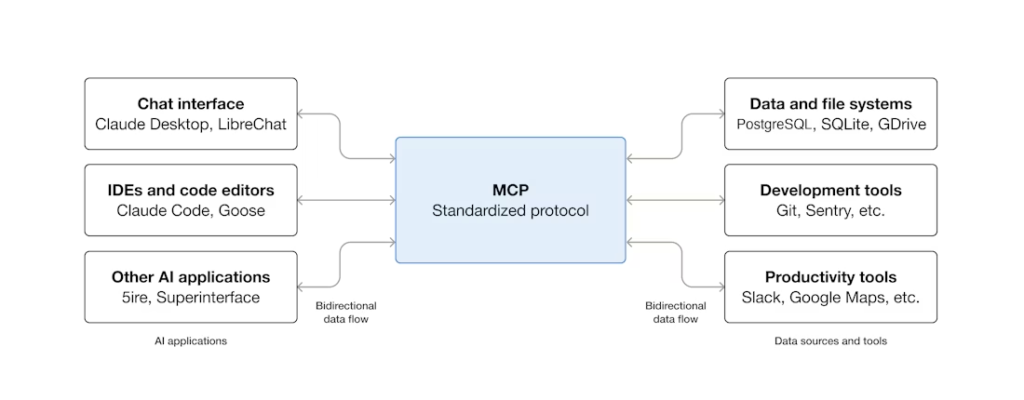
Source: https://modelcontextprotocol.io/docs/getting-started/intro
Example:
If you have an MCP Server with access to your MS Office 365 tools via Claude Desktop. You can ask Claude to ‘Check calendar availability for 1st Feb 2026 and book a 30 mins meeting with your manager in working hours.’
Host :- User with MS Office Account using Claude.ai
Client :- Claude Desktop’s Client, call our MCP server with request, get back to host with response from MCP Server
MCP Server :- Access Office 365, Search Calendar, Check availability, Search Manager, Book meeting, Send back response
When I read/listen about MCP in different forums, I also hear a lot of misunderstanding as well as misconception about it.
In one line, MCP = Access and not Intelligence.
MCP allows AI assistant to take set of approved actions on the systems which it can access. It doesn’t make AI assistants more smarter.
MCP server can only access resources which are provided/built as part of it’s code. It can’t magically connect to things. Example if MCP is built to call numbers from a phonebook, it can’t call a number which is not there in the phonebook.
MCP can’t bypass security/access control. If the server has read-only access to a database, it can’t write or manipulate the data. Similarly if access to PII data/HR data is restricted, it can’t magically access it.
MCP Can’t work offline/independently. If there is MS Office outage or Database is under maintenance or User access is revoked, it can’t complete the task shared by host.
While MCP facilitates AI assistants to take actions, but it can only do what Host is asking it to do. It can’t take critical decisions on its own, yet. For ex. it can fetch data from a database and generate analysis/report, however what decision should be taken based on it is still depends on the host (User).
In a nutshell, MCP provides AI assistants access, not autonomy.
(Thoughts are personal, not polished yet by GenAI)
I will follow-up with a technical overview of MCP next month.